Developer Guide
- Acknowledgements
- Design
- Implementation
- Documentation, logging, testing, configuration, dev-ops
- Appendix: Requirements
- Appendix: Instructions for manual testing
- Appendix: Planned Enhancements
Acknowledgements
Design
 Tip: The
 .puml files used to create diagrams are in the repository’s docs/diagrams folder.
Architecture
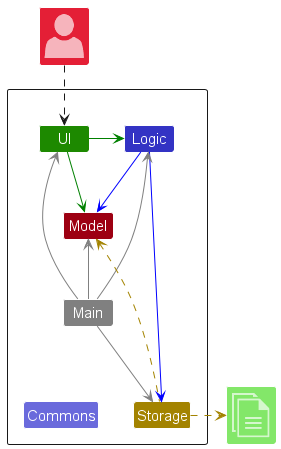
The Architecture Diagram given above explains the high-level design of the App.
Given below is a quick overview of main components and how they interact with each other.
Main components of the architecture
Main (consisting of classes
Main and
MainApp) is in
charge of the app launch and shut down.
- At app launch, it initializes the other components in the correct sequence, and connects them up with each other.
- At shut down, it shuts down the other components and invokes cleanup methods where necessary.
The bulk of the app’s work is done by the following four components:
-
UI: The UI of the App. -
Logic: The command executor. -
Model: Holds the data of the App in memory. -
Storage: Reads data from, and writes data to, the hard disk.
Commons represents a collection of classes used by multiple other components.
How the architecture components interact with each other
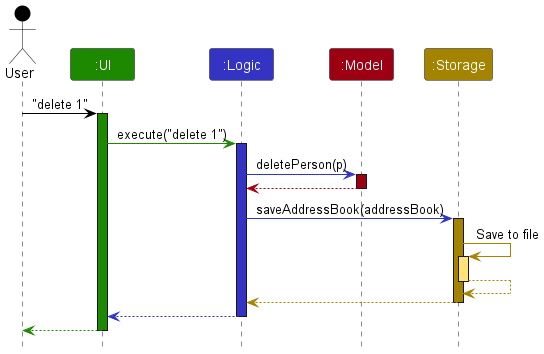
The Sequence Diagram below shows how the components interact with each other for the scenario where the user issues
the command delete 1.
Each of the four main components (also shown in the diagram above),
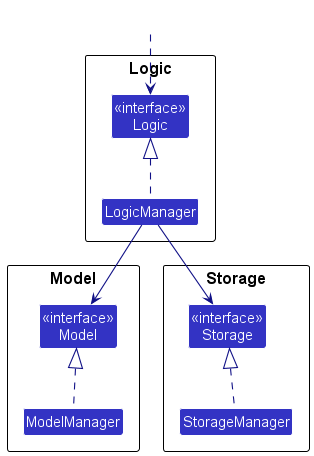
- defines its API in an
interfacewith the same name as the Component. - implements its functionality using a concrete
{Component Name}Managerclass (which follows the corresponding API)interfacementioned in the previous point.
For example, the Logic component defines its API in the Logic.java interface and implements its functionality using
the LogicManager.java class which follows the Logic interface. Other components interact with a given component
through its interface rather than the concrete class (reason: to prevent outside component’s being coupled to the
implementation of a component), as illustrated in the (partial) class diagram below.
The sections below give more details of each component.
UI component
The API of this component is specified in
Ui.java
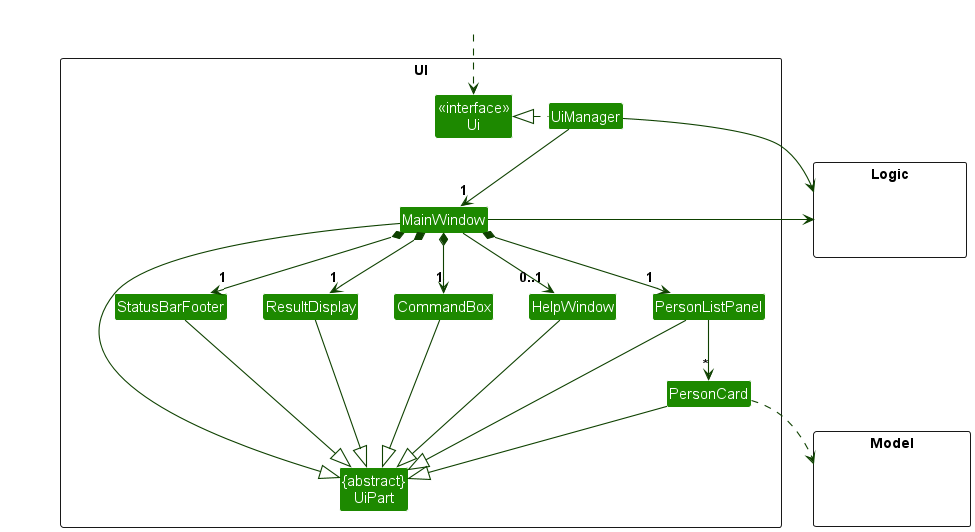
The UI consists of a MainWindow that is made up of parts e.g.CommandBox, ResultDisplay, PersonListPanel,
StatusBarFooter etc. All these, including the MainWindow, inherit from the abstract UiPart class which captures
the commonalities between classes that represent parts of the visible GUI.
The UI component uses the JavaFx UI framework. The layout of these UI parts are defined in matching .fxml files that
are in the src/main/resources/view folder. For example, the layout of the
MainWindow
is specified in
MainWindow.fxml
The UI component,
- executes user commands using the
Logiccomponent. - listens for changes to
Modeldata so that the UI can be updated with the modified data. - keeps a reference to the
Logiccomponent, because theUIrelies on theLogicto execute commands. - depends on some classes in the
Modelcomponent, as it displaysPersonobject residing in theModel.
Logic component
API :
Logic.java
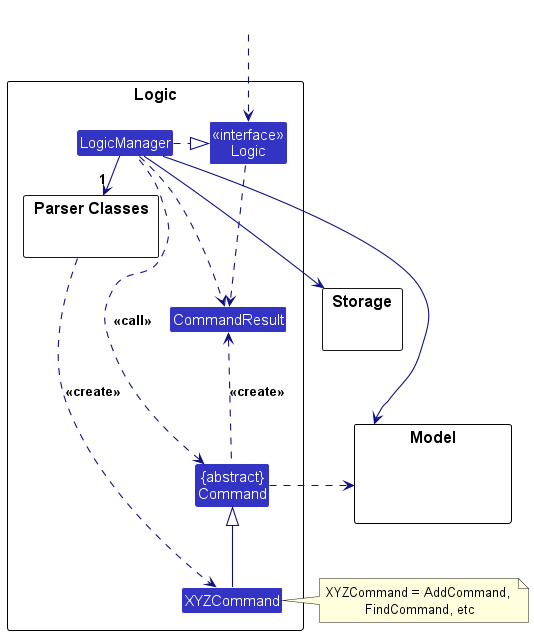
Here’s a (partial) class diagram of the Logic component:
The sequence diagrams below illustrate the interactions within the Logic component for representative commands.
execute("delete 1"):
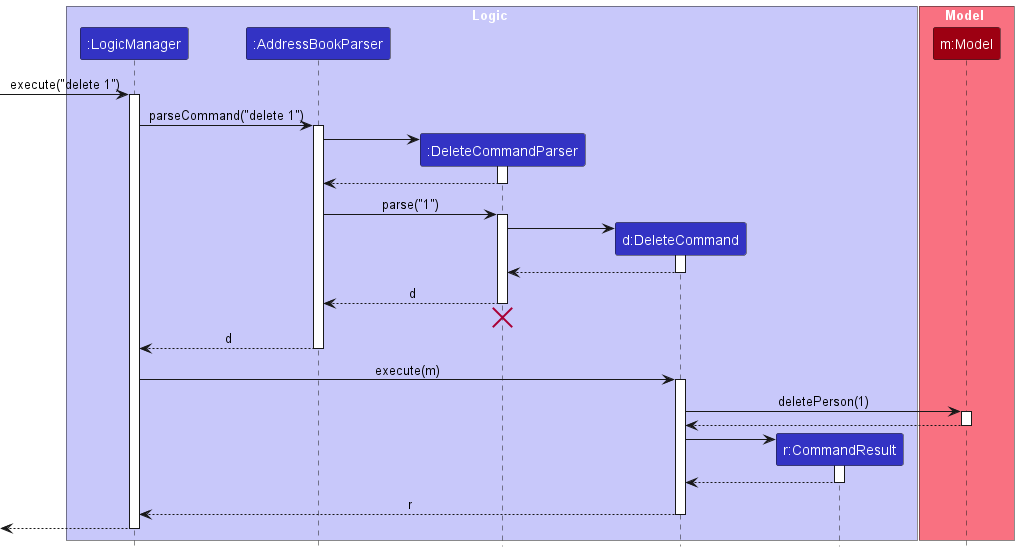
 Note: The lifeline for
 DeleteCommandParser should end at the destroy marker (X) but due to a limitation of PlantUML, the lifeline continues till the end of diagram.
execute("add n/John ..."):
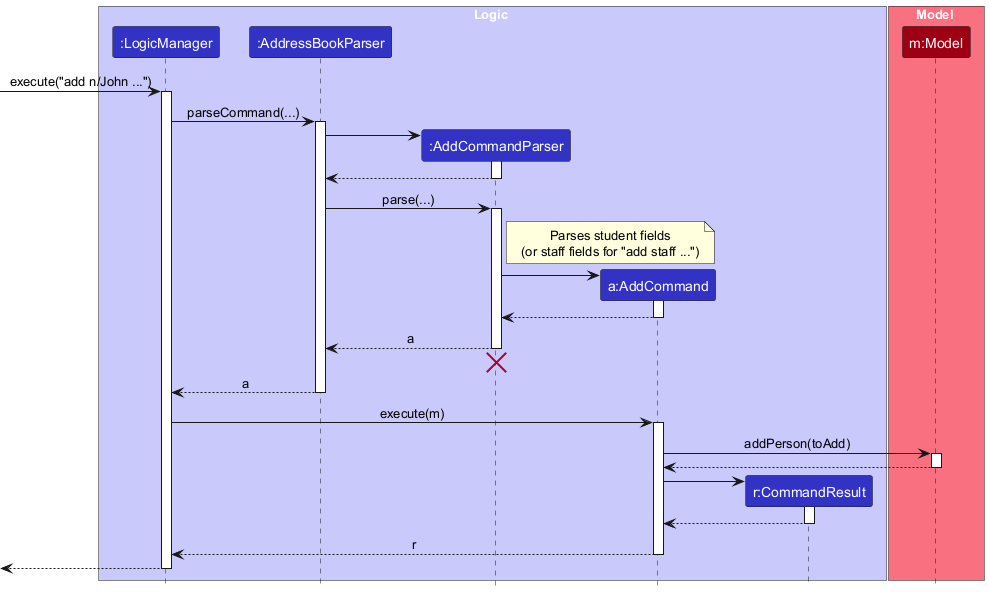
Note: The lifeline for AddCommandParser should end at the destroy marker (X) but due to a limitation of PlantUML, the lifeline continues till the end of diagram.
execute("list"):
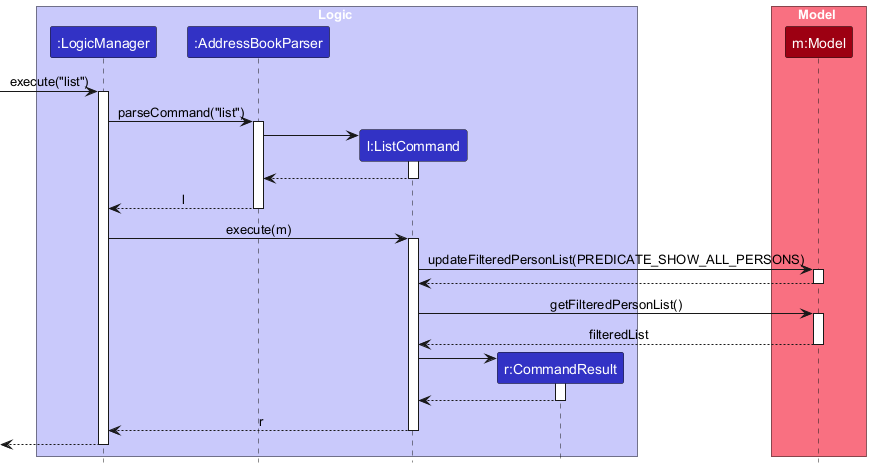
How the Logic component works:
- When
Logicis called upon to execute a command, it is passed to anAddressBookParserobject which in turn creates a parser that matches the command (e.g.,DeleteCommandParser) and uses it to parse the command. - This results in a
Commandobject (more precisely, an object of one of its subclasses e.g.,DeleteCommand) which is executed by theLogicManager. - The command can communicate with the
Modelwhen it is executed (e.g. to delete a person).
Note that although this is shown as a single step in the diagram above (for simplicity), in the code it can take several interactions (between the command object and theModel) to achieve. - The result of the command execution is encapsulated as a
CommandResultobject which is returned back fromLogic.
Here are the other classes in Logic (omitted from the class diagram above) that are used for parsing a user command:
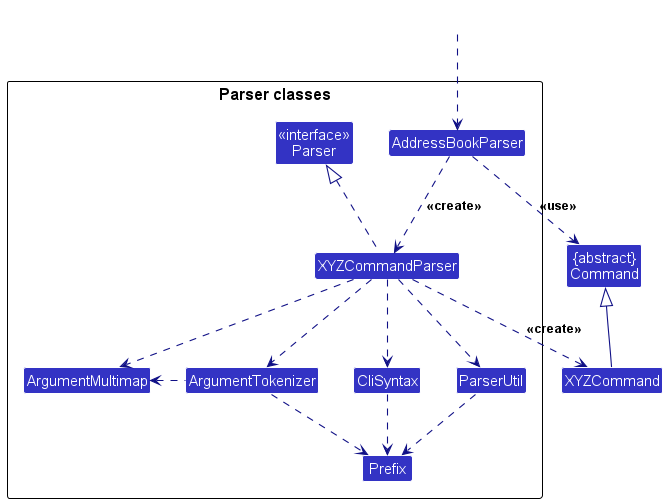
How the parsing works:
- When called upon to parse a user command, the
AddressBookParserclass creates anXYZCommandParser(XYZis a placeholder for the specific command name e.g.,AddCommandParser) which uses the other classes shown above to parse the user command and create aXYZCommandobject (e.g.,AddCommand) which theAddressBookParserreturns back as aCommandobject. For example,AddCommandParserhandles bothadd(student) andadd staff(teaching staff) by inspecting the preamble; list filtering is handled byListCommand (list),StaffListCommand (staffslist), andStudentListCommand (studentslist).. - All
XYZCommandParserclasses (e.g.,AddCommandParser,DeleteCommandParser, …) inherit from theParserinterface so that they can be treated similarly where possible e.g, during testing.
Model component
API :
Model.java
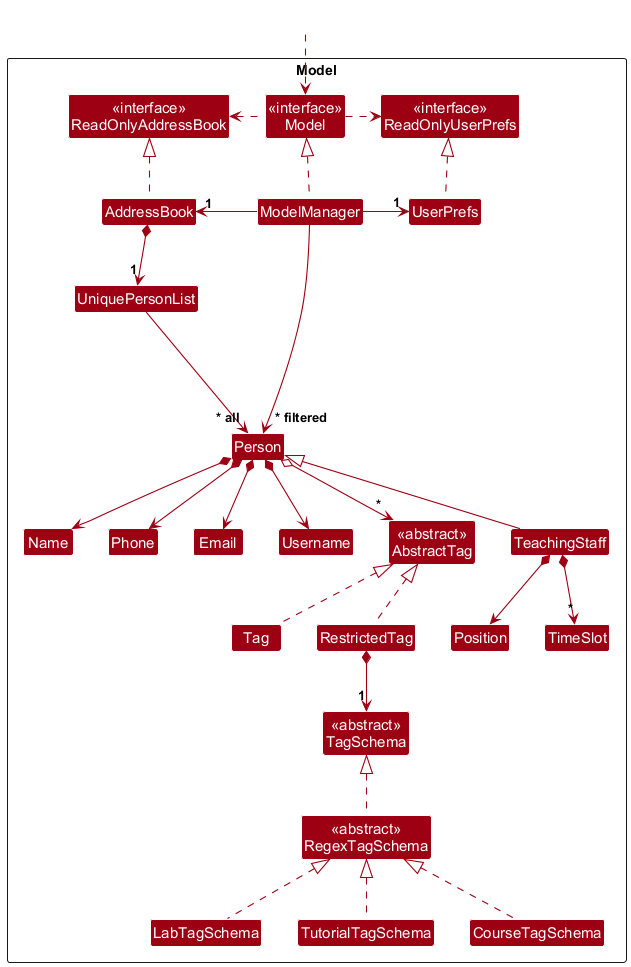
The Model component,
- stores the address book data i.e., all
Personobjects (which are contained in aUniquePersonListobject). A person may be a student (basePerson) or teaching staff (TeachingStaff, which extendsPersonand adds aPositionfield; allowed values are “Teaching Assistant” and “Professors”). - stores the currently ‘selected’
Personobjects (e.g., results of a search query or list filter) as a separate filtered list which is exposed to outsiders as an unmodifiableObservableList<Person>that can be ‘observed’ e.g. the UI can be bound to this list so that the UI automatically updates when the data in the list change. Commands such aslist,staffslist, andstudentslistupdate this filter to show all persons, only teaching staff, or only students respectively. - stores a
UserPrefobject that represents the user’s preferences. This is exposed to the outside as aReadOnlyUserPrefobjects. - does not depend on any of the other three components (as the
Modelrepresents data entities of the domain, they should make sense on their own without depending on other components)
Storage component
API :
Storage.java
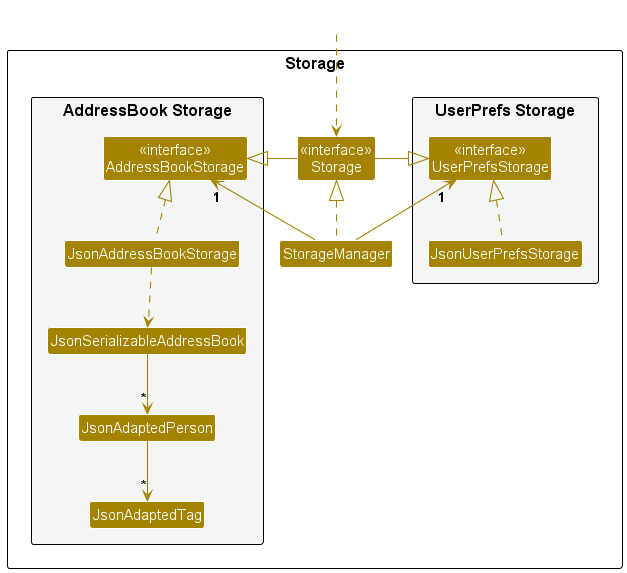
The Storage component,
- can save both address book data and user preference data in JSON format, and read them back into corresponding objects.
- inherits from both
AddressBookStorageandUserPrefStorage, which means it can be treated as either one (if only the functionality of only one is needed). - depends on some classes in the
Modelcomponent (because theStoragecomponent’s job is to save/retrieve objects that belong to theModel)
Common classes
Classes used by multiple components are in the seedu.address.commons package.
Implementation
This section describes some noteworthy details on how certain features are implemented.
Person and TeachingStaff
The address book holds a single list of Person objects. Two types of persons are supported:
-
Students — base
Personinstances, added withadd n/NAME p/... e/... u/.... -
Teaching staff —
TeachingStaffinstances (extendPerson) with an additionalPositionfield. Added withadd staff n/NAME p/... e/... u/... [pos/POSITION]where name, phone, email, username are mandatory andpos/POSITIONis optional.Positionis restricted to “Teaching Assistant” or “Professors” (input is matched case-insensitively; the model stores the canonical spelling).
Phone numbers are validated as Singapore numbers ([3689]\\d{7}): exactly 8 digits, starting with 3, 6, 8, or 9.
Email implements case-insensitive equality: Email#equals and Email#hashCode use a normalized (trimmed,
upper-cased) form so duplicate-email checks in AddCommand reject addresses that differ only by letter case, while
the stored string keeps the user’s casing.
The UI and commands treat both types uniformly as Person where possible (e.g. find, delete by index). The filtered
list in the model can show all persons (list), only teaching staff (staffslist), or only students (studentslist)
by setting a predicate on the underlying list. edit supports an optional pos/POSITION field that applies only to
teaching staff.
Tagging System
AbstractTags are optionally allowed to be added to any Person/TeachingStaff. These are further divided into two groups: Tag and RestrictedTag. (See Model Component)
Either variant of tag can be constructed using TagFactory.create(tag). Which one is created depends on the format of the tag provided. The following rule is utilised: a RestrictedTag will use : as a delimiter (e.g. tut:A10). Otherwise, it is treated as Tag.
Tag Validation Flow
- Tag: A simple Regex is used to determine if it is valid (alphanumeric only)
- RestrictedTag (
prefix:value)- A schema of the registered
prefixis selected (SeeTagFactory.getAssociatedSchema()) - A
RestrictedTagis constructed with the corresponding schema -
RestrictedTag’s constructor will passvalueinto the schema to check against its own specified validation method - Should validation fail, an error is thrown
- A schema of the registered
Tutorial/Lab Tag Design Rationale
- Tutorial and Lab tags optionally allow a course to be associated with these tags. (so
tut:A13is distinct fromtut:A13-CS2103)- Reasoning: We leave the choice of convention to the user. For example, if they mainly teach CS1231S, they could decide that the one without the course marker is from their main course (so that it is easier to spot).
- A
coursetag does not have to already be attached to the person- We prioritise user flexibility over strict enforcement.
- Reasoning: The course suffix is mainly for contextual metadata. For example, a user may wish to disambiguate two tutorial groups by attaching a course identifier, but does not want the additional course tag cluttering the tag list.
Tutor Availability Scheduling
Overview
Teaching staff members can specify when they are available to teach using the tutorslot command. This feature adds a
Set<TimeSlot> field to the TeachingStaff model, where each TimeSlot represents a day-of-week and time range (e.g.,
Monday 10:00–12:00). Availability is append-only from the CLI: you can add slots with tutorslot, but there is no
command to edit or remove an individual slot (workarounds: delete the staff contact or advanced editing of the data
file; planned fixes are listed in Appendix: Planned Enhancements). In other words,
slot management supports Create only, not full CRUD on each slot.
The exact behaviour is as follows: adding a tutorslot only works for a teaching staff member in the current displayed
list; the slot must be a same-day DAY-START-END whole-hour range with START < END; crossing midnight is invalid;
overlapping or duplicate slots are rejected; boundary-touching slots are allowed; and successful additions are
append-only.
Implementation
The feature is implemented across the following components:
Model:
-
TimeSlot— An immutable value object containing aDayOfWeek, aLocalTimestart, and aLocalTimeend. Supports parsing from string formatDAY-START-END(e.g.,mon-10-12). ImplementsComparable<TimeSlot>for sorted display. Crossing-midnight slots are intentionally not supported in this format. -
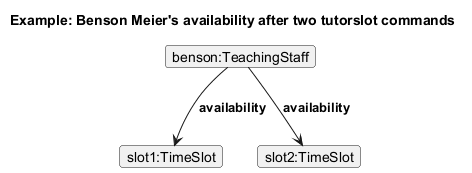
TeachingStaff— Extended with aSet<TimeSlot> availabilityfield. A new constructor accepts availability alongside existing fields. ThegetAvailability()method returns an unmodifiable set.
Logic:
-
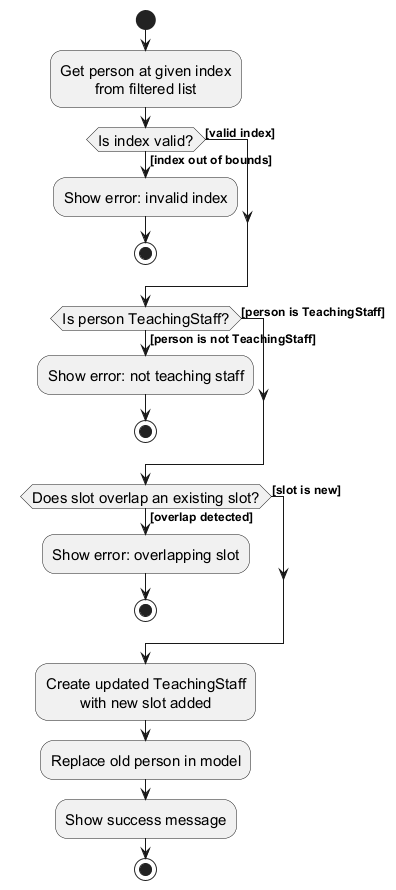
TutorSlotCommand— Takes anIndexand aTimeSlot. On execution, it:- Retrieves the person at the given index from the filtered list.
- Validates that the person is a
TeachingStaffinstance. - Checks for overlapping time slots on the same day (exact duplicates are a subset of overlap).
- Constructs a new
TeachingStaffwith the slot added (preserving immutability). - Replaces the old person in the model via
Model#setPerson().
-
TutorSlotCommandParser— ParsesINDEX SLOTfrom user input, delegating toParserUtil#parseTimeSlot()for validation.
Storage:
-
JsonAdaptedTimeSlot— Serialises aTimeSlotas its string representation (e.g.,"mon-10-12") using@JsonValue. -
JsonAdaptedPerson— Extended with aList<JsonAdaptedTimeSlot> availabilityfield, serialised only for staff-type persons.
The following activity diagram summarises the decision flow when tutorslot is executed:
The following sequence diagram shows how the tutorslot 1 mon-10-12 command flows through the Logic component:
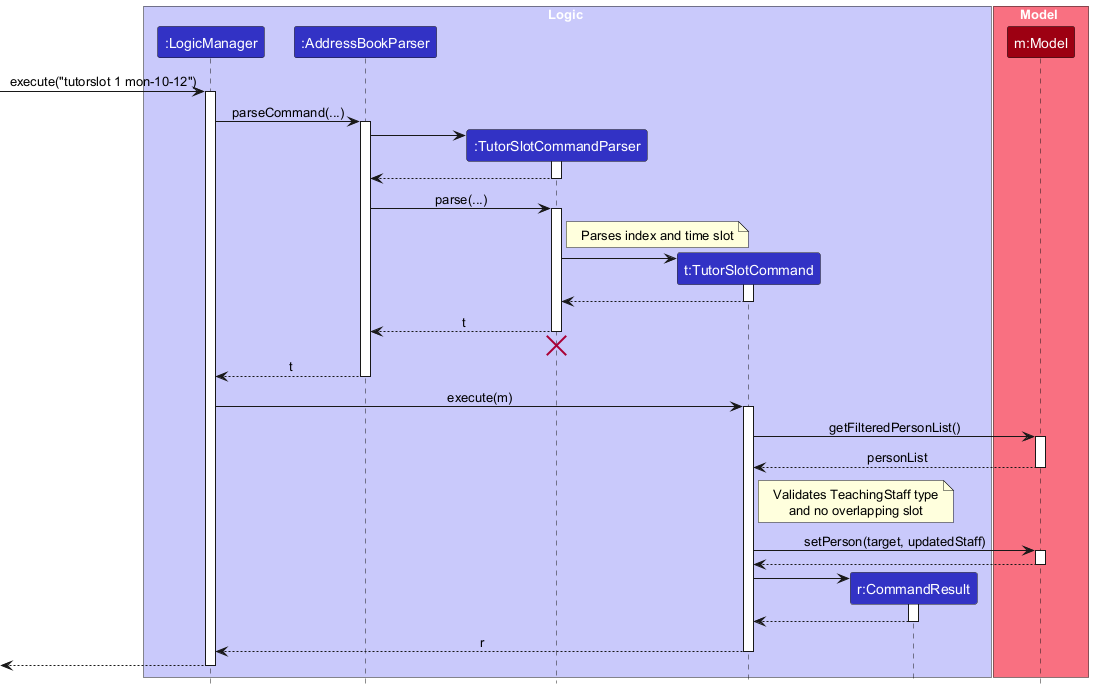
Note: The lifeline for TutorSlotCommandParser should end at the destroy marker (X) but due to a limitation of PlantUML, the lifeline continues till the end of the diagram.
The object diagram below shows an example state of a TeachingStaff object after two tutorslot commands have been
executed:
Viewing Availability: tutordashboard
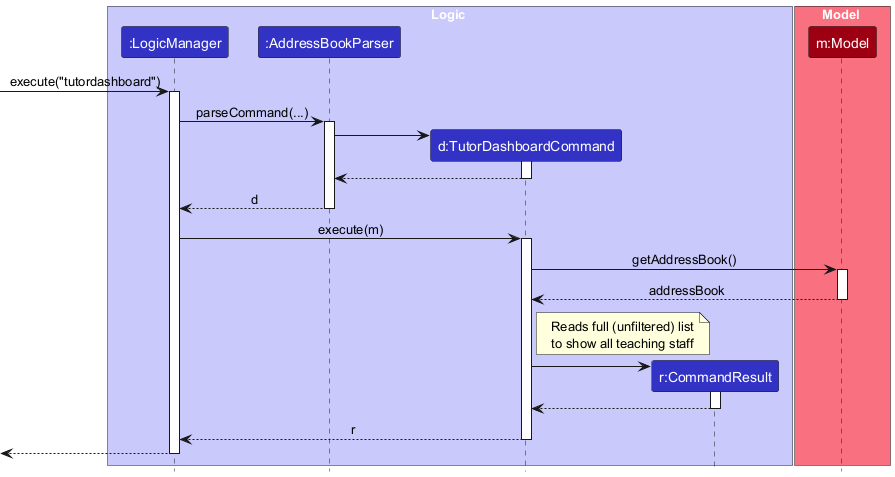
The TutorDashboardCommand is a read-only command that produces a formatted availability summary for all teaching
staff.
Key design decisions:
-
Reads from the full address book (
model.getAddressBook().getPersonList()), not the filtered list. This ensures the dashboard is always complete even when the user has filtered to show only students. -
Sorted display — slots for each staff member are inserted into a
TreeSet, which usesTimeSlot’s natural ordering (day-of-week first, then start time) via itsComparableimplementation. -
No model mutation — the command produces only a
CommandResult; it does not modify any data. -
No parser needed — the command takes no arguments and is returned directly by
AddressBookParser. Extra trailing arguments are currently ignored for no-argument commands (e.g.,tutordashboard foo).
The following sequence diagram shows how the tutordashboard command is executed:
Design Considerations
Aspect: Where to store availability
-
Alternative 1 (current choice): Store
Set<TimeSlot>directly inTeachingStaff.- Pros: Simple, self-contained. Each staff member owns their availability data.
- Cons: Adding a slot requires constructing a new
TeachingStaff(immutability constraint).
-
Alternative 2: Store availability in a separate
AvailabilityManagerin the model.- Pros: Decouples availability from the person model; easier to query across all staff.
- Cons: Adds complexity; requires cross-referencing persons by identity.
Export Contacts Feature
Overview
The export command allows users to export all contacts currently listed in the address book to a CSV file. This feature enables users to back up their data or share contacts with others in a common CSV format.
Implementation
The feature is implemented across the following components:
Logic:
-
ExportCommand— Takes a file path as a parameter. On execution, it:- Calls
CsvExporter#exportContacts(Model, filePath)to export all contacts currently displayed in the filtered list to the specified file. The exported contacts are therefore affected by commands that filter the displayed list (e.g. staffslist, studentslist, find). - If the specified directory to export the contacts to does not exist, CsvExporter will recursively create all the directories required.
- Returns a
CommandResultwith a success message containing the file path. - Throws
CommandExceptionif anIOExceptionorInvalidPathExceptionoccurs during the export process.
- Calls
-
ExportCommandParser— Parses user input with optional file path prefixf/. If no file path is provided, uses the default location (./export.csv).
Storage:
-
CsvExporter— Utility class responsible for:- Converting each
Personto CSV format usingconvertToCSV(Person). - Writing all contacts to the specified CSV file.
- Handling both students and teaching staff, including tags and time slots for staff.
- Converting each
Command Format:
-
export— Exports to./export.csv(default location). -
export f/FILE_PATH— Exports to the specified file path.
Design Considerations
Aspect: Where to place export logic
-
Alternative 1 (current choice): Place export logic in
CsvExporterutility class in the storage component.- Pros: Separates export logic from command logic; reusable; easy to add other export formats.
- Cons: Storage component has some export responsibilities.
-
Alternative 2: Place all export logic in
ExportCommand.- Pros: Command-specific logic is contained in the command.
- Cons: Harder to test independently; less reusable.
Import Contacts Feature
Overview
The import command allows users to import contacts in the address book from a CSV file.
This gives users a way to restore accidentally deleted contacts and to add multiple contacts quickly.
Implementation
The feature is implemented across the following components:
Logic:
-
ImportCommand— Takes a file path as a parameter. On execution, it:- Calls
CsvImporter#importContacts(Model, filePath)to import all contacts that currently do not exist. - Returns a
CommandResultwith a success message containing the file path. - Throws
CommandExceptionif anIOExceptionoccurs during the import process or when the csv file is corrupted, i.e, has invalid format, resulting in aDeserialisePersonException.
- Calls
-
ImportCommandParser— Parses user input with compulsory file path prefixf/.
Storage:
-
CsvImporter— Utility class responsible for:- Reading from the csv file containing all the contacts.
- Adds all deserialised
Personinto the model. UsesCsvPersonDeserialiser#deserialise(personStrRep)to deserialise each csv row representing a person.
-
CsvPersonDeserialiser- Utility class responsible for:- Deserialising a csv representation string of a
Personinto aPersonobject.
- Deserialising a csv representation string of a
Command Format:
-
import f/FILE_PATH— Imports contacts from the specified file path.
Design Considerations
Aspect: Where to place import logic
-
Alternative 1 (current choice): Place import logic in
CsvImporterandCsvPersonDeserialiserutility classes in the storage component.- Pros: Able to test the logic for deserialisation and import easily and separately from the command execution and separately from each other.
- Cons: Storage component contains deserialisation logic which is slightly out the scope of responsibilities of the storage component.
-
Alternative 2: Place all import logic in
ImportCommand.- Pros: The logic is contained within a single class, making it easy to read and understand.
- Cons: Difficult to isolate testing of deserialisation logic separately.
Double Confirmation
Overview
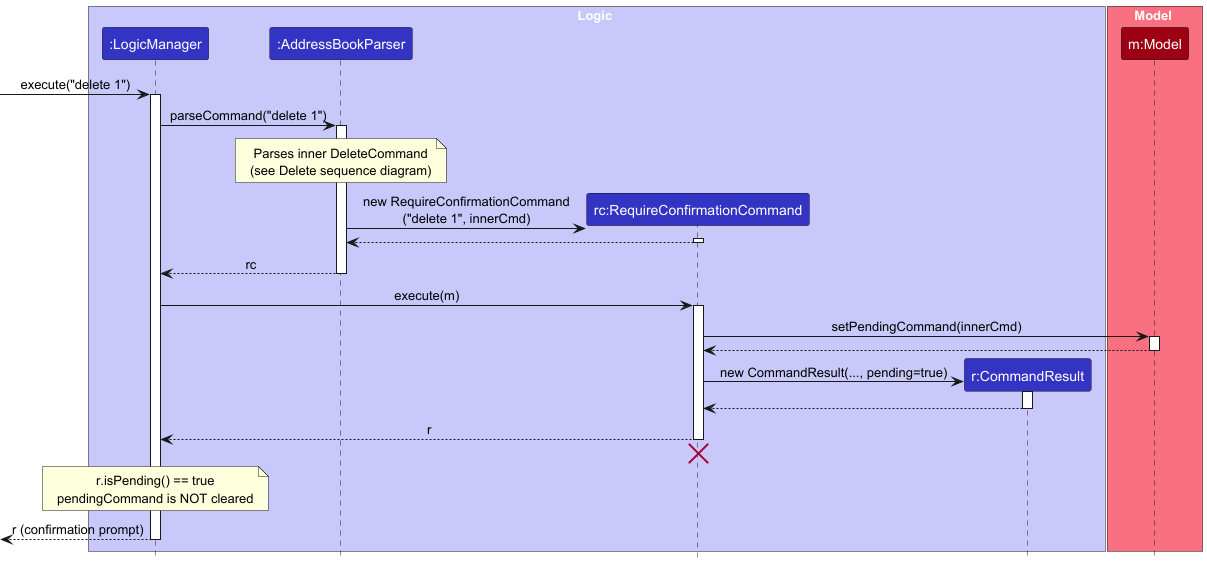
Certain commands that are destructive or irreversible — currently delete and clear — require the user to explicitly confirm before they are executed. These commands implement the CriticalCommand marker interface, which causes AddressBookParser to intercept them and wrap them in a RequireConfirmationCommand instead of executing them directly.
Implementation
The feature introduces the following classes:
-
CriticalCommand— Any command implementing it will be intercepted byAddressBookParserand require confirmation before execution, and have a verification step before requiring confirmation. -
RequireConfirmationCommand— Wraps aCriticalCommand. On execution, it stores the wrapped command as a pending command inModeland returns aCommandResultwithpending=true, prompting the user to confirm. -
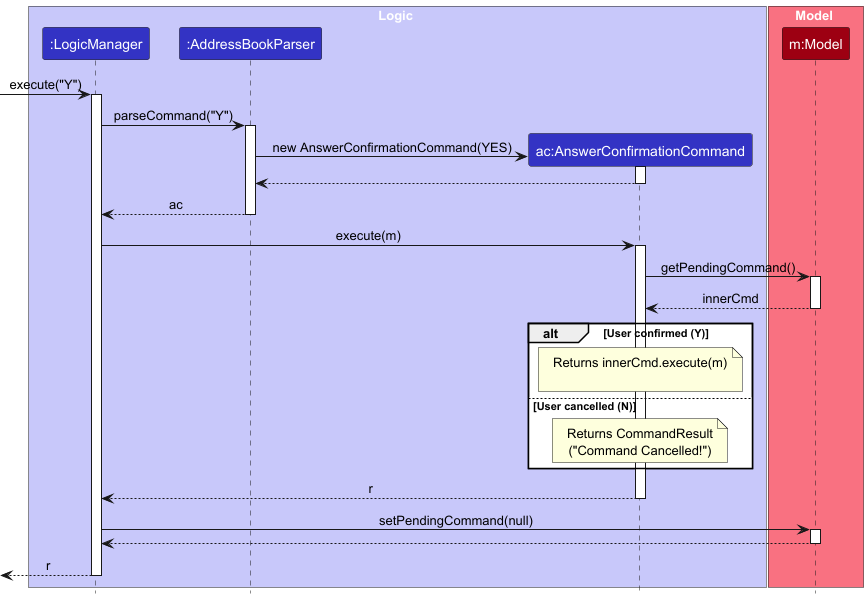
AnswerConfirmationCommand— Handles the user’s Y or N response.YandNmust be exact match to confirm, bothYandNare case-sensitive. On Y, it retrieves and executes the pending command from Model. On N, it returns a cancellation message. If any other command is submitted while a confirmation is pending, the pending command is automatically discarded before the new command is processed. -
CommandResult#isPending()— Flag that tellsLogicManagernot to clear the pending command fromModelwhentrue. -
Model#pendingCommand— Field inModelManagerthat holds the deferred command between the two interactions.
The following sequence diagram shows how a critical command (e.g. delete 1) is intercepted and a confirmation prompt is issued:
The following sequence diagram shows how the user’s answer (Y to confirm, N to cancel) is handled:
Documentation, logging, testing, configuration, dev-ops
Appendix: Requirements
Product scope
Product: Doritus — An address book software for NUS teaching staff to manage student contacts.
Target user profile:
- NUS teaching staff (lecturers, instructors, and teaching assistants) who manage hundreds to thousands of students each
semester. Staff roles in real life (e.g. lecturer, instructor) are not all listed as separate
pos/values in Doritus: the product only supports positionsTeaching AssistantandProfessors(see User Guide); users may map broader roles to these values or omitpos/where appropriate. - prefer desktop apps that run locally on their own laptops
- can type fast and are comfortable with command-style (CLI-like) interfaces
- frequently need to retrieve student context quickly during emails, grading, and office hours
- need to organise students by module, tutorial, and lab group, and to reset cohorts each semester while keeping old records for reference
Value proposition:
- Focusing on the unique hierarchy of campus life.
- Mapping students by course codes, TAs by labs and tutorials.
- Allows a professor or teaching assistant to retrieve vital contact context or generate student lists quickly
- Ensuring that managing a massive network of names never interrupts the flow of deep work or teaching.
User stories
Priorities: High (must have) - * * *, Medium (nice to have) - * *, Low (unlikely to have) - *
| Priority | As a … | I want to … | So that I can … |
|---|---|---|---|
* * * |
new user | see usage instructions | refer to instructions when I forget how to use the Doritus |
* * * |
user | add a new contact | store contact details (name, phone, email, username, and optional tags) for future reference |
* * * |
user | delete a contact | remove withdrawn students or duplicate entries |
* * * |
user | find a person by name, phone, email, username, or tags | locate details of persons without having to go through the entire list |
* * * |
professor | add tags to contacts | categorize students by course, tutorial, or lab |
* * |
professor that teach many students | search and filter contacts (e.g. using find, list, staffslist, or studentslist) |
locate a person easily |
* * |
professor that teach many courses | search persons by tags | locate details of persons in a course, tutorial, or lab easily |
* * |
forgetful user | perform fuzzy and partial match searches | locate a person without remembering the full name of that person |
* |
professor that works in a group | selectively import and export contacts in some formats | share contacts data with others |
* * |
user | see contextual error messages when a command fails | know what is the problem and fix it |
* |
user | access my input history | run similar commands easily |
* * |
sloppy user | double confirm some dangerous operations | keep my contacts data safe from mistakes |
* |
sloppy user | undo some commands | revert the effects of mistakes |
* |
user | have some customized configuration options | customize this software to improve my efficiency and comfort |
* * |
professor | archive a completed semester’s cohort | start each new semester with a clean state |
* |
professor | record short notes about students | recall important context when meeting them again in future semesters |
* * |
tutor/professor | state when I am available to teach | specify my availability so students know when I can teach |
* * |
tutor/professor | view the availability of all tutors in one place | see who is able to teach at a glance |
Note (student ID and “ID” in user stories): Doritus does not store or validate a separate NUS Student ID field; identity in the app is based on name, phone, email, username (and teaching-staff position), as described under Duplicate contacts in the User Guide and under Student ID in the Glossary below. The username is the main user-chosen identifier analogous to an “ID” in some workflows. There is no dedicated “sort by name or ID” command: users narrow the list using find and the list commands (list, staffslist, studentslist).
Use cases
(For all use cases below, the System is the Doritus and the Actor is the user, unless specified otherwise)
Use case: UC01 - Add a contact
MSS
- User requests to add a person with all required details.
-
System adds the person.
Use case ends.
Extensions
-
1a. User does not provide all required details.
-
1a1. System shows an error message.
Use case resumes at step 1.
-
-
1b. User provides invalid details. (e.g., invalid name format)
-
1b1. System shows an error message.
Use case resumes at step 1.
-
Use case: UC02 - Delete a contact
MSS
- User requests to show all contacts.
- System shows contacts.
- User requests to delete the identified contact by its index.
- System double checks with the user if they would like to proceed with the deletion.
- User confirms that they would like to delete the contact.
-
System removes the contact.
Use case ends.
Extensions
-
5a. User declines the action.
-
5a1. System notifies user that deletion was cancelled, as requested.
Use case ends.
-
-
5b. User tries performing some other command.
-
5b1. System automatically cancels the pending deletion.
Use case ends.
-
Use case: UC03 - Find a person by fields
MSS
- User requests to find a person by name, phone, email, username or any combination of these fields (name, phone, email, username)
-
System shows a list of persons whose name, phone, email and username match the search query
Use case ends.
Extensions
-
1a. User does not provide a search query.
-
1a1. System shows an error message.
Use case resumes at step 1.
-
-
1b. User provides an invalid search query (e.g., invalid name format).
-
1b1. System shows an error message.
Use case resumes at step 1.
-
Use case: UC04 – Add tags to a person
MSS
- User requests to show all contacts.
- Doritus shows contacts.
- User identifies the correct person and notes their
indexin the displayed list. - User enters a list of tags to be added to the person at
index. -
Doritus adds the tag to the person and shows a success message including the updated tags.
Use case ends.
Extensions
-
4a. The given index is invalid (not corresponding to a person).
- 4a1. Doritus shows an error message explaining that the index must refer to a contact in the displayed list.
-
4a2. User checks the displayed list and corrects their mistake.
Use case resumes at step 4.
-
4b. The given tag is invalid.
- 4b1. Doritus shows an error message describing the validation problem (e.g. invalid characters, invalid format).
-
4b2. User checks the entered tags and corrects their mistake.
Use case resumes at step 4.
-
4c. A given tag already exists for that person.
-
4c1. Doritus shows a warning (non-fatal) that the tag already exists.
Use case resumes at step 5.
-
Use case: UC05 – Prepare a tutorial group contact list for attendance
MSS
- User requests to view all contacts.
- Doritus shows the contacts.
- User narrows down the list to a specific tutorial or lab group using
find t/TAG(e.g.,find t/tut:A10). - Doritus shows only the contacts belonging to that tutorial or lab group.
-
User uses the displayed list to take attendance or copy email addresses.
Use case ends.
Extensions
-
1a. The address book is empty.
-
1a1. Doritus shows an empty list with a message such as “No contacts found. Add your first contact to get started!”.
Use case ends.
-
-
3a. The specified tag or filter value is invalid.
- 3a1. Doritus shows an error message explaining the valid format for tags/filters.
-
3a2. User re-enters the filter with a valid value.
Use case resumes at step 3.
-
4a. No contacts match the specified tutorial or lab group.
- 4a1. Doritus shows an empty list and a message such as “No contacts found for this group”.
-
4a2. User may try a different group or adjust the filter.
Use case resumes at step 3.
Use case: UC06 - see command instructions
MSS
- User requests help (e.g. enters
help). -
Doritus opens the help window and shows the message
Opened help window.in the command result area. The help window provides a link to the online User Guide; full command text is not listed in the result panel.Use case ends.
Extensions
-
1a. User types extra text after
help(e.g.help 123).-
1a1. Doritus treats the input as
help(extraneous parameters are ignored, per the User Guide) and proceeds as in the MSS.Use case ends.
-
-
1b. User specifies an invalid command (not recognised by the application).
-
1b1. Doritus shows an error message.
Use case resumes at step 1.
-
Use case: UC07 – Add availability to a teaching staff member
MSS
- User lists teaching staff using
staffslist, or lists all contacts usinglist. - Doritus shows the selected list.
- User identifies the target person and notes their index.
- User enters
tutorslot INDEX DAY-START-END(e.g.,tutorslot 1 mon-10-12). -
Doritus adds the time slot to the staff member and shows a success message.
Use case ends.
Extensions
-
4a. The person at the given index is not a teaching staff member.
-
4a1. Doritus shows an error message indicating the person is not teaching staff, and suggests using
staffslistif the user intended to target a tutor.Use case resumes at step 4.
-
-
4b. The time slot format is invalid.
- 4b1. Doritus shows an error message explaining the valid format (
DAY-START-END). -
4b2. User re-enters the command with a valid time slot.
Use case resumes at step 4.
- 4b1. Doritus shows an error message explaining the valid format (
-
4c. The time slot overlaps with an existing slot for this staff member.
-
4c1. Doritus shows
This time slot overlaps with an existing slot for this teaching staff member.Use case resumes at step 4.
-
Use case: UC08 – View tutor availability dashboard
MSS
- User enters
tutordashboard. -
Doritus displays a numbered list of all teaching staff, each with their available time slots sorted by day and start time.
Use case ends.
Extensions
-
2a. There are no teaching staff in the address book.
-
2a1. Doritus shows
No teaching staff found.Use case ends.
-
-
2b. A teaching staff member has no time slots set.
-
2b1. Doritus shows
(no slots set)for that staff member.Use case continues from step 2 for remaining staff.
-
Non-Functional Requirements
- Should work on any mainstream OS (Windows, Linux, macOS) as long as it has Java
17or above installed. - Should remain responsive (each command completing within 1 second) for address books with up to 5,000 contacts.
- A user with above-average typing speed for regular English text should be able to accomplish most common tasks faster using commands than using the mouse (CLI-first design).
- All user data should be stored locally in a human-editable text file format (e.g., JSON) so that advanced users can inspect and edit data directly if needed.
- The application should be portable and runnable from a single JAR file, without requiring a separate installer.
- The software should not depend on any team-hosted remote server; all core features must work fully offline.
- The product should be designed for single-user usage on a single machine at a time (no concurrent multi-user access to the same data file).
- The application should fail gracefully when the data file is missing or corrupted, with clear error messages and without crashing.
Glossary
- Doritus: An address book software for NUS teaching staff to manage student contacts; the application described in this document.
-
Contact: A record representing a person in the address book; either a student (base
Person) or teaching staff (TeachingStaff), including fields such as name, phone, email, username, and tags. Teaching staff additionally have aPosition(Teaching Assistant or Professors). -
Student ID: In real life, NUS may assign identifiers such as
A1234567Zto students. Doritus does not store or validate a separate Student ID field; duplicate detection uses the same identity rules as in the User Guide (Duplicate contacts), not an NUS ID. -
Teaching staff: Persons represented by the
TeachingStaffclass (extendsPerson), with aPositionfield restricted to “Teaching Assistant” or “Professors”. Added viaadd staff; listed viastaffslistorlist. - Position: The role of a teaching staff member; only “Teaching Assistant” and “Professors” are allowed (user input may use any letter case; stored values use the canonical spellings above).
- Tag: A short label attached to a contact (e.g., module code, tutorial group, lab group) used for grouping and filtering contacts.
- Tutorial group / Lab group: A subgroup of students within a module, usually associated with a specific weekly session; commonly represented as tags in Doritus.
-
Time slot: A day-of-week and hour range (e.g., Monday 10:00–12:00) representing when a teaching staff member is
available to teach. Stored as
TimeSlotobjects in aSet<TimeSlot>on eachTeachingStaff. Added withtutorslot; viewed withtutordashboard. - Mainstream OS: Windows, Linux, macOS.
Appendix: Instructions for manual testing
Given below are instructions to test the app manually.
Note: These instructions only provide a starting point for testers to work on;
testers are expected to do more exploratory testing.
Launch and shutdown
-
Initial launch
-
Download the jar file and copy into an empty folder
-
Double-click the jar file Expected: Shows the GUI. If no data file was present yet, sample contacts are loaded; if a data file already exists (including an empty list), that file is used instead. The window size may not be optimum.
-
-
Saving window preferences
-
Resize the window to an optimum size. Move the window to a different location. Close the window.
-
Re-launch the app by double-clicking the jar file.
Expected: The most recent window size and location is retained.
-
Deleting a person
-
Deleting a person while all persons are being shown
-
Prerequisites: List all persons using the
listcommand. Multiple persons in the list. -
Test case:
delete 1, thenY
Expected: First contact is deleted from the list after confirmation. Details of the deleted contact shown in the status message. Timestamp in the status bar is updated. -
Test case:
delete 0
Expected: No person is deleted. Error details shown in the status message. Status bar remains the same. -
Other incorrect delete commands to try:
delete,delete x,...(where x is larger than the list size)
Expected: Similar to previous.
-
Staff listing and dashboard
-
staffslistandtutordashboardignore extra parameters-
Test case:
staffslist anything
Expected: Command succeeds and displays only teaching staff. -
Test case:
tutordashboard foo
Expected: Command succeeds and shows full staff availability dashboard.
-
Tutor slot validation
-
Add a valid slot
-
Prerequisites:
staffslistshows at least one teaching staff. -
Test case:
tutorslot 1 mon-10-12
Expected: Slot is added to the first listed teaching staff.
-
-
Reject overlapping slot
-
Prerequisites: Execute
tutorslot 1 mon-10-12first. -
Test case:
tutorslot 1 mon-10-11
Expected: Command fails withThis time slot overlaps with an existing slot for this teaching staff member.
-
-
Accept boundary-touching slot
-
Prerequisites: Execute
tutorslot 1 mon-10-12first. -
Test case:
tutorslot 1 mon-12-14
Expected: Slot is added successfully because boundary-touching slots do not count as overlap.
-
-
Reject crossing-midnight slot
- Test case:
tutorslot 1 mon-23-24
Expected: Command fails because24is outside the allowed hour range0-23; slots that cross midnight are not supported in the current format.
- Test case:
Adding tags
Prerequisites: At least 1 person exists in the displayed list
- Add valid tag
- Test case:
tag-add 1 t/friend t/course:CS2103TExpected: the tagsfriendandcourse:CS2103Twill be added to the existing list of tags for the person located at index1. The course tag is colour-coded and will appear beforefriend.
- Test case:
- Reject invalid tag
- Test case:
tag-add 1 t/frie,ndExpected: Command fails, explaining that the provided tag’s format only accepts alphanumeric characters - Test case:
tag-add 1 t/course:CS2103TTTExpected: Command fails, explaining that the provided tag’s format is invalid and provides the allowed syntax for course
- Test case:
Appendix: Planned Enhancements
- Accept more teaching-staff roles in
add staff: the currentpos/field accepts onlyTeaching AssistantandProfessors. We plan to expand this to additional common NUS teaching roles such asLecturerandInstructor, while still storing a canonical display value and listing the accepted roles in the validation message. - Add editing of individual tutor availability slots: Doritus will support correcting one existing slot for a teaching staff member, for example changing
Mon 10:00-12:00toMon 11:00-13:00, without requiring deletion of the whole contact or manual editing of the JSON data file. - Add deletion of individual tutor availability slots: Doritus will support removing one existing slot for a teaching staff member, for example deleting
Mon 10:00-12:00from a staff member who has multiple slots, without requiring deletion of the whole contact or manual editing of the JSON data file. - Currently our import feature only supports CSV files that are produced via the
exportcommand ofDoritus. A planned enhancement is to allow the import of contacts from Microsoft Outlook contacts via the export csv feature of Outlook